

r.nz Domain Setup Guide
Set Up Your Premium Short Domain in 5 Easy Steps
The r.nz domain setup guide shows you how to choose a memorable r.nz domain, select the right plan, create your account, connect a destination and confirm that your new address is live. r.nz is designed for businesses, creators, marketers and organisations that want a premium short domain they can use across websites, social media, campaigns, QR codes and printed marketing. Your r.nz domain can point visitors to the website or online destination you already use. You do not need to rebuild your website or replace your existing primary domain. Instead, you choose a short r.nz name and manage where it sends visitors from your r.nz dashboard. This r.nz domain setup guide covers the redirect setup available today and gives you a clean foundation for managing your r.nz domain.
Before You Start the r.nz Domain Setup Guide
Setup is easier if you have three things ready before you begin:
- The r.nz domain name you want to claim
- The email address you want to use for your account
- The destination URL you want visitors to reach
Your destination could be your main website, online store, booking page, campaign landing page, social media profile or another secure web page.
If you have not chosen a name yet, start with the r.nz Domain Name Search.
Search for your business name, brand, service, campaign or another short word that is easy to spell and remember.
A strong short domain should be clear enough to say aloud, simple enough to type correctly and flexible enough to keep using even if the destination behind it changes later.
For more ideas on choosing a memorable name, explore Premium Names.
Step 1: Search for Your r.nz Domain
The first step in the r.nz domain setup guide is choosing the domain your audience will see.
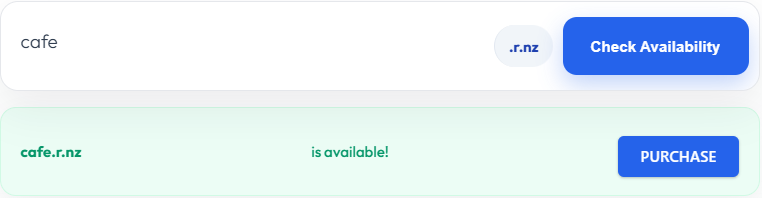
Use the r.nz search tool to check whether your preferred name is available.
If you run a café, for example, you might search for a short name such as:
cafe.r.nz
If your first choice is unavailable, try a concise variation connected to your brand, product, service or location.
When choosing your r.nz domain, prioritise a name that is:
- Short and easy to type
- Easy to pronounce
- Easy to remember
- Relevant to your business or campaign
- Suitable for websites, social media and print
Avoid unnecessary numbers, confusing spelling or a name that only makes sense for one short-lived campaign unless that is exactly what you need.
A premium short domain works best when people can see it once, remember it and type it later without having to search for your original link.
Domain names are part of the wider Domain Name System. If you want additional technical background, ICANN explains how domain names and DNS work.
For information about the wider New Zealand domain space, visit InternetNZ’s .nz domain information.
Once you have found an available r.nz domain that fits your brand, continue to the next step.
Step 2: Choose Your r.nz Plan
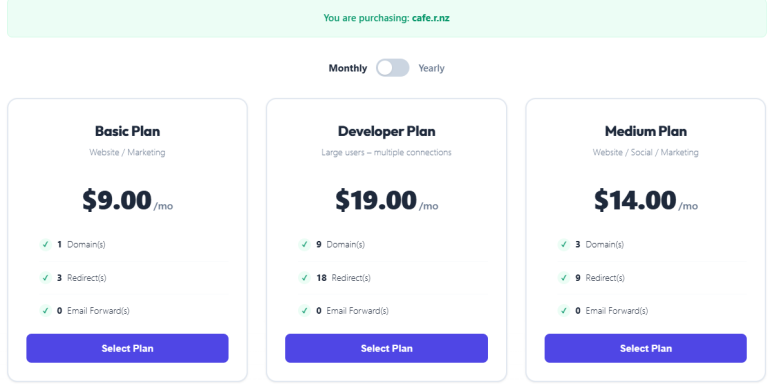
The second stage of this r.nz domain setup guide is selecting the plan that matches how you want to use your domain.
Visit Plans & Pricing and compare the available options.
Choose your plan based on the number of r.nz domains and redirects you need now, while leaving room for future campaigns, social profiles or additional destinations.
A base r.nz domain can become your primary memorable address, while additional redirect paths can help organise different destinations.
For example:
- cafe.r.nz
- cafe.r.nz/menu
- cafe.r.nz/deals
- cafe.r.nz/facebook
Your main domain could connect customers to your website while individual paths provide direct routes to important pages.
For example:
- cafe.r.nz → Main website
- cafe.r.nz/menu → Current menu
- cafe.r.nz/deals → Latest offers
- cafe.r.nz/facebook → Facebook profile
This gives your audience a consistent short domain while allowing you to organise several useful destinations.
Choose the plan that matches your current needs and review the available monthly or yearly billing options before continuing.
Step 3: Create Your r.nz Account
Next, the r.nz domain setup guide takes you through account creation.
Enter the requested account information and carefully check the r.nz domain displayed during signup.
Before submitting your order:
- Check your contact information.
- Confirm your selected r.nz domain.
- Review your chosen plan.
- Read the r.nz service terms.
- Complete your registration.
You should also read and accept the r.nz Terms & Conditions before completing your order.
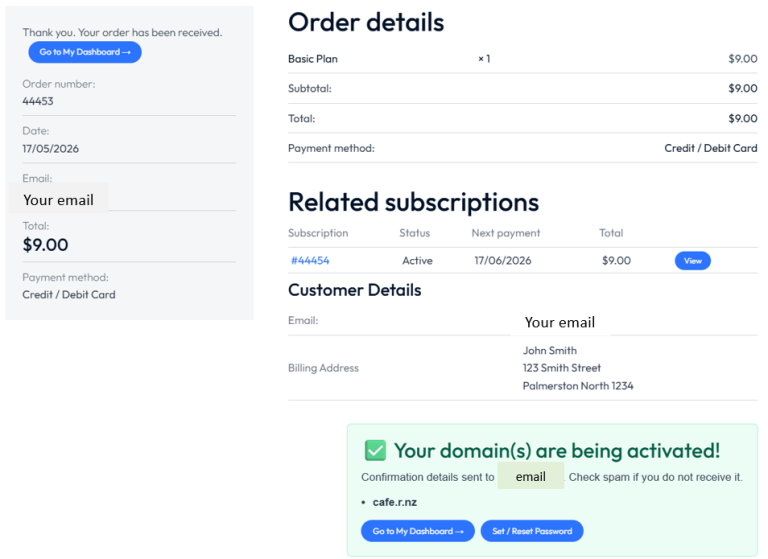
Once registration has been submitted, your account will be processed for activation.
When your account is active, you will receive confirmation and can continue to your r.nz dashboard.
Your dashboard is the central place for managing your r.nz domain and its current destination.
Keep your login information secure because your dashboard provides control over your domain settings and redirects.
Step 4: Connect Your r.nz Domain to a Destination
This is the main connection stage of the r.nz domain setup guide.
Open your r.nz dashboard and select the domain you want to configure.

Choose:
Manage
Then select:
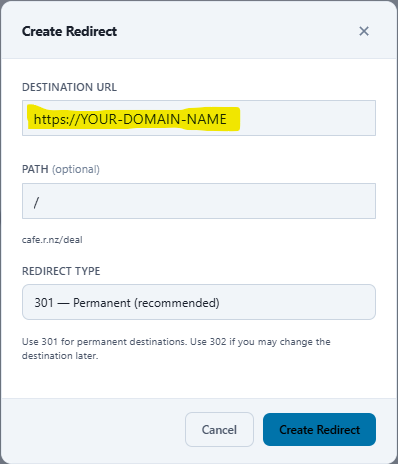
+ Add Redirect
In the Destination URL field, enter the complete web address where you want visitors to go.
Your r.nz domain can currently connect visitors to destinations such as:
- Your main business website
- A product or service page
- An online store
- A booking or enquiry page
- A campaign landing page
- An Instagram profile
- A Facebook page
- A LinkedIn profile
- A TikTok or YouTube account
- A portfolio
- A property listing
- An event registration page
For more information about the technology behind the connection, read How Domain Redirects Work.
How Your r.nz Domain Redirect Works
A domain redirect connects your short public-facing r.nz domain with another web destination.
For example:
cafe.r.nz → your-long-existing-website.co.nz
Your customers only need to remember the shorter r.nz address.
The destination behind your r.nz domain can also be changed later. This means the domain you have already printed on a sign, menu, brochure, business card or advertisement can remain the same even when the page behind it changes.
That flexibility is one of the practical advantages of using a premium short domain as part of your marketing.
Add Additional Domain Paths
You can also configure supported paths for separate destinations.
For example:
- cafe.r.nz/menu
- cafe.r.nz/book
- cafe.r.nz/offers
- cafe.r.nz/social
The main cafe.r.nz domain could point to your homepage while cafe.r.nz/menu sends customers directly to your menu.
This allows one memorable r.nz identity to support several parts of your business.
When the destination is correct, select:
Create Redirect
r.nz performs destination security checks to help protect the platform and visitors from unsafe or abusive redirects.
If your destination is flagged, review the warning shown in the dashboard and check the destination before continuing.

Step 5: Confirm Your r.nz Domain Is Live
The final step of the r.nz domain setup guide is testing your new domain yourself.
Open a new browser window or tab and type your complete r.nz address.
For example:
cafe.r.nz
Your browser should take you directly to the destination you configured.
Check that:
- Your r.nz domain opens correctly
- The expected destination loads
- HTTPS works normally
- Additional paths go to the correct pages
- The destination works on desktop
- The destination works on mobile
If cafe.r.nz is connected to your existing café website, typing the short domain into the browser should take the visitor directly to that website.
Once the test is successful, your r.nz domain is ready to share.
You can now use it on:
- Websites
- Social media profiles
- Business cards
- Digital advertisements
- Menus
- QR codes
- Email signatures
- Brochures
- Posters
- Property signs
- Campaign material
- Videos and presentations
Your short domain can now become a consistent part of how customers find your business online.
Why Use a Premium Short Domain with r.nz?
This r.nz domain setup guide is about more than getting a redirect online.
The goal is to give your audience a premium short domain that is easier to recognise, remember, type and share than a long destination URL.
A memorable domain can act as the public-facing address for your digital presence while the underlying website, landing page or campaign changes over time.
That becomes especially useful when the same domain appears across printed and digital marketing.
Imagine printing thousands of business cards with a long campaign URL. If the landing page changes, those cards immediately become outdated.
With an r.nz domain, you can keep the memorable public address and update its destination behind the scenes.
Businesses can use an r.nz domain for a memorable route to their website or booking system.
Marketers can use one for campaigns and promotions.
Creators can connect a short domain to a portfolio or social profile.
Real estate professionals can connect domains to listings.
Event organisers can point domains to registrations, schedules or ticketing.
To explore more examples, visit Who Needs a Premium Name.
If social media is an important part of your business, also see the Social Media Bios guide.
Your r.nz Domain Is More Than a Random Short Link
Traditional URL shorteners often generate addresses made from random characters.
r.nz takes a different approach.
You choose a memorable domain that can represent your business, brand, campaign, service or identity.
Instead of sharing something difficult to remember, you can use a domain such as:
menu.r.nz
book.r.nz
cafe.r.nz
yourbrand.r.nz
The goal is not simply to make a URL shorter.
The goal is to give you a cleaner and more memorable domain that can become part of your public identity.
This distinction is important as r.nz continues developing as a domain platform.
Redirects are one of the core ways customers can use their domains today, while the r.nz domain remains the central identity people see and remember.
Managing Your r.nz Domain After Setup
Completing the r.nz domain setup guide does not mean your destination has to remain fixed forever.
Your r.nz domain can stay consistent while you update the destination behind it through your dashboard.
This gives you flexibility when:
- A campaign ends
- A product page changes
- A booking system changes
- A social media profile moves
- Your website is rebuilt
- You launch a new promotion
- You want to send visitors somewhere new
Before making an important change, check that the new destination URL is correct and secure.
After saving the change, open your r.nz domain in a browser again to confirm that everything works as expected.
Your domain remains the memorable address your audience knows while you retain flexibility behind the scenes.FAQ’s – Support questions
What is r.nz used for?
r.nz is used to create short, branded subdomains that instantly redirect to any URL, making long or messy links clean, memorable, and easy to share.
How do I create a short link with r.nz?
Choose a subdomain under r.nz, enter your destination URL, and the redirect activates instantly. No coding or technical setup is required.
Is r.nz a URL shortener?
No, the key difference — r.nz gives you your own custom subdomain instead of a random shortened string. This improves trust, branding, and click‑through rates.
Why are r.nz links so short?
Because r.nz is a rare one‑letter NZ domain, allowing extremely compact subdomains like go.r.nz, me.r.nz, or shop.r.nz.
Are r.nz redirects fast?
Yes. r.nz uses global edge routing for near‑instant redirects, ensuring fast performance in New Zealand and worldwide.
Can I change the destination of my r.nz link?
Yes. You can update your redirect at any time without changing your subdomain, making it ideal for campaigns and rotating promotions.
Is r.nz good for marketing campaigns?
Yes. Short, branded subdomains increase trust and engagement, making them perfect for ads, QR codes, social media, and print materials.
Can I track clicks on my r.nz link?
Yes. r.nz has a built-in analytics tool, allowing you to measure traffic for each subdomain.
Is r.nz secure?
Yes. r.nz includes monitoring to prevent malicious redirects, phishing, and abuse, ensuring safe use of the domain.
Can I use multiple subdomains?
Yes, you can create and manage as many subdomains as your account allows, each with its own redirect rules.
- x.r.nz
- x.r.nz/support
- x.r.nz/services
Who typically uses r.nz?
People who need clean, memorable links, including:
Businesses
Marketers
Real estate agents
Creators and influencers
Anyone sharing URLs
Does r.nz work with any website?
Yes. r.nz redirects can point to any website, platform, or online service, including social profiles, landing pages and listings.
Why choose r.nz over Bitly or other shorteners?
r.nz gives you a branded subdomain, not a random link, offering:
Better trust
Better branding
Better memorability
Faster redirects
Simpler management
How do I get started with r.nz?
Pick a subdomain, set your redirect, and your link goes live immediately.
Are you a New Zealand business?
Yes, we are fully locally owned and operate from New Zealand.

